How deals work
What a deal is, what every field on it means, and how to read one before you spend money.
A deal is a standing offer to buy one specific product at a published price.
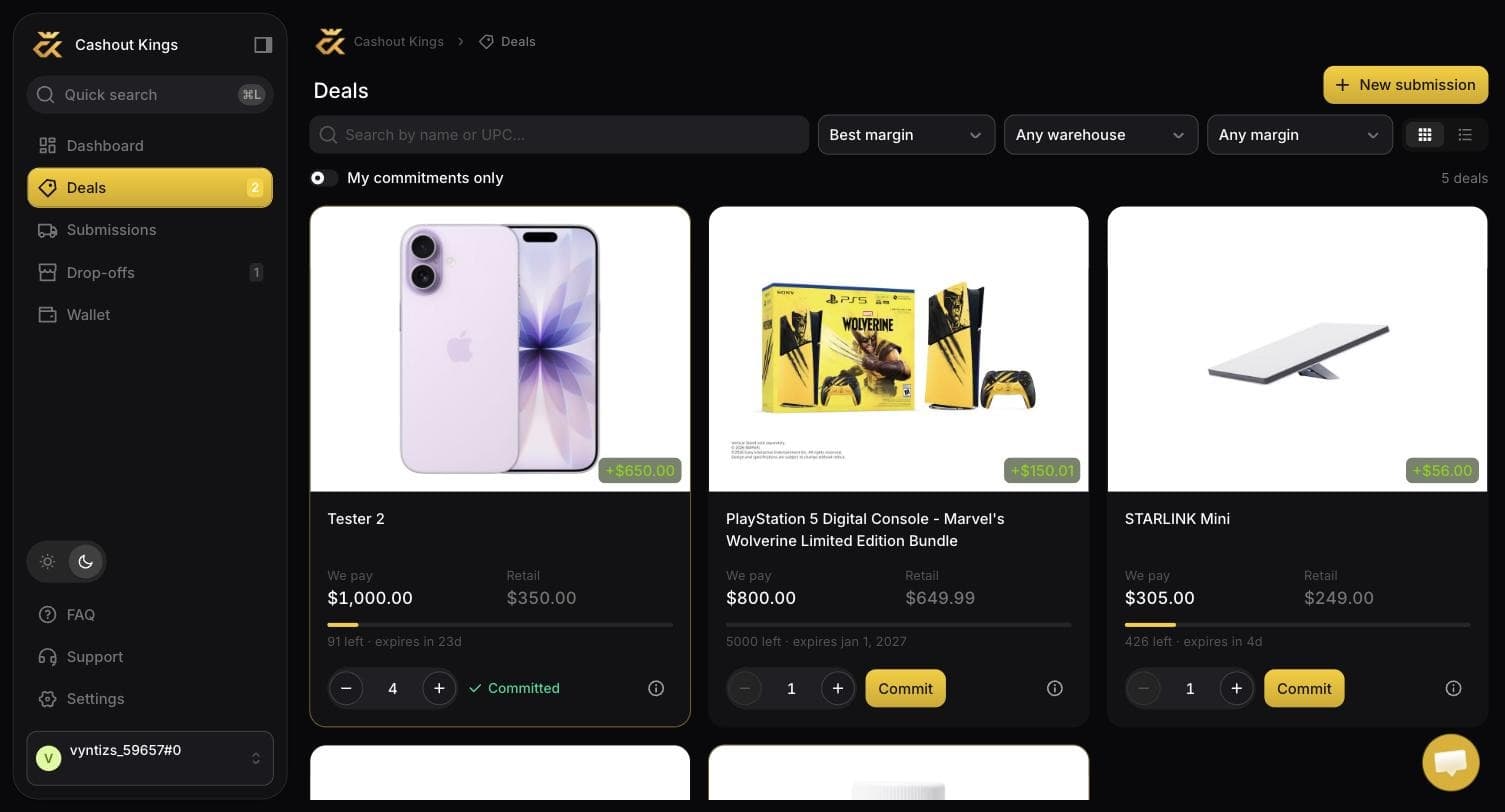
The green badge on each card is your margin at MSRP. The stepper and Commit button are on the card itself, so committing never needs a second page.
What every field means
| Field | Meaning |
|---|---|
| Product name and image | The exact item. Colour, capacity and bundle all matter — "HP 15 fd0694wm" and "HP 15 fd0093dx" are different deals with different prices. |
| UPC | The barcode number. This is what the warehouse scans, and it is what decides whether your goods matched a deal. It is the identity of the deal, not the name. |
| We pay | What lands in your balance per unit received. |
| Retail (MSRP) | What the product normally sells for. A reference point, not a promise about what you will pay. |
| You keep | The difference. Our margin figure assumes you paid MSRP; if you find it on sale, you keep more. |
| Warehouses | Which of our sites accept this product. Not every deal is accepted everywhere. |
Reading a deal before you buy
Check the UPC, not the name
Retailers list near-identical variants under nearly identical names. Match the UPC on the product page against the UPC on the deal. If they differ, it is a different product and it will not be paid.
Check where it is accepted
A deal accepted only in California is a bad deal for you if you are in Maine and the shipping eats the margin. The warehouse list is on the deal for exactly this reason.
Work out your real margin
Take We pay, subtract what you will actually pay at retail, then subtract shipping per unit and any insurance. That is your margin. The You keep figure on the deal is a starting point, not your result.
Deals change
Prices move. A deal can be repriced or closed at any time, and the price you are eventually paid is the price recorded when your goods physically arrive — not the price on the screen when you committed. This matters enough to have its own page.
Finding deals
- In the app under Deals, with the full catalogue and filters.
- In Discord, where new deals and price changes are posted as they happen. If you want to catch a good margin early, this is the fastest channel.
- On the public site, where a few of the widest margins are shown without signing in.
Condition is not negotiable
Everything must be new, sealed, and in its original retail packaging. Open box, "like new", customer returns and resealed items are rejected at check-in and paid nothing.